Debloat AI
- 4.5
- Rating
- 10.00K
- Installs
- Free
- Price

 Analysis by App-foxy
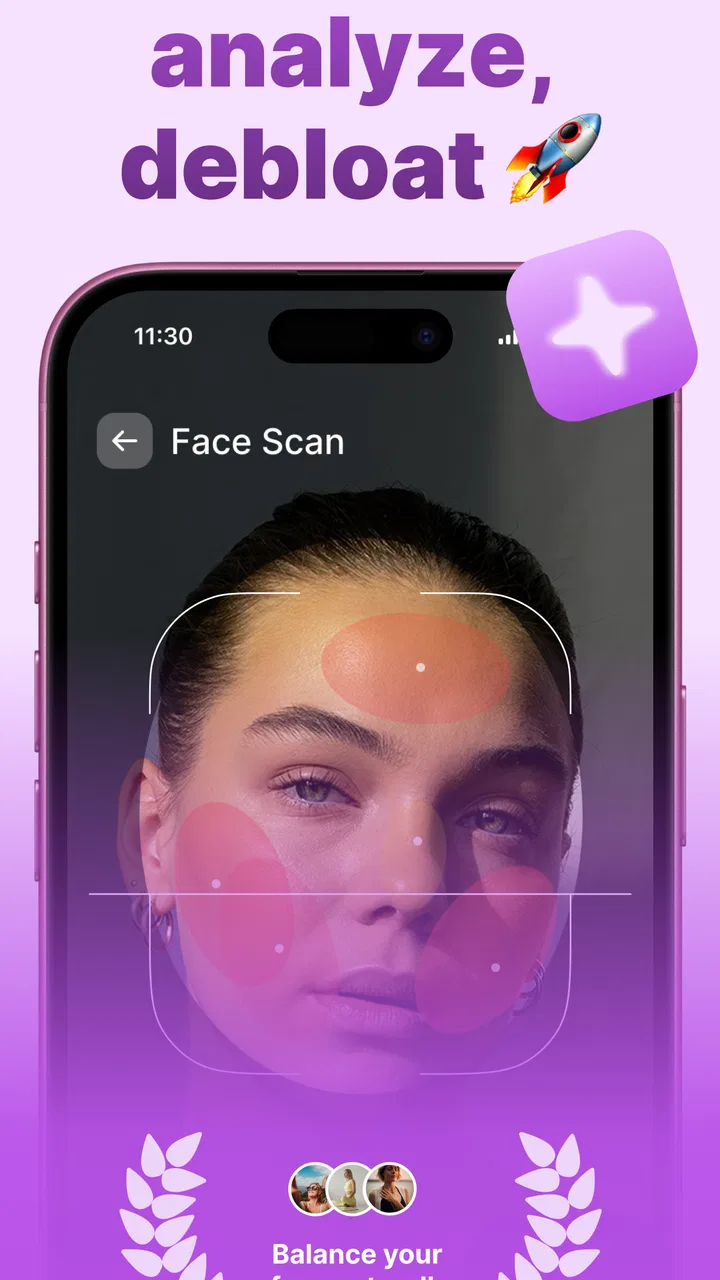
I tried Debloat AI with a simple goal: see whether a beauty app focused on facial puffiness could fit into an ordinary morning rather than becoming another complicated editing tool. Its store summary, “Transform Your Face!”, sets an ambitious tone, while the shorter description, “Debloat AI,” is much more specific. In practice, that distinction matters. This is best understood as a focused face-editing app, not a complete makeup studio, medical tool, or replacement for a photo editor with dozens of controls.
The app comes from Appstack Tech, Inc. and sits in the Beauty category. It is free to install, rated for Everyone, and works on Android devices running version 8.0 or later. The current release is 1.0.10. I also noticed that the app has built a 4.7 average from around 2K ratings, with over 10K installs, so it is still a relatively small product rather than a long-established platform with a huge user community.
From a puffy-morning photo to a usable result
The most useful way to judge this app is to follow the complete workflow. Imagine waking up late, taking a quick selfie before a video call, and feeling that your face looks more tired or swollen than you expected. The starting condition is not a professional portrait session. It is an everyday image with uneven light, a casual expression, and a person who wants a subtle improvement without spending ten minutes learning editing controls.
You May Also Like

 AccuWeather: Weather Radar
AccuWeather Review: A Quick, Clear Forecast for Everyday Decisions
For everyday plans, the best forecast is the one you can understand quickly. AccuWeather makes rain timing, radar, and local conditions easy to act on, with a few trade-offs.

 Hill Climb Racing
Why Hill Climb Racing Still Turns Crashes Into One More Run
A tiny car, a bumpy hill and one more upgrade: Hill Climb Racing keeps resurfacing because its simple chaos makes every near-miss feel personal.

 AliExpress - Shopping App
AliExpress Makes Global Shopping Feel Personal, but Shoppers Bear the Risk
AliExpress turns a global marketplace into a pocket-sized discovery engine. Its reach is useful, its shopping loop compelling, and its trade-offs easy to miss.

 Lords Mobile: Kingdom Wars
Lords Mobile Is a Kingdom-Building Routine, Not a Quick Match
A case-by-case verdict on the building, battles, device demands, and social commitments that make Lords Mobile rewarding for some players and exhausting for others.

 PDF Scanner app - TapScanner
TapScanner Makes Paperwork Easier to Capture, Check, and Share
TapScanner makes scanning with a phone feel less like a rescue operation and more like a dependable step in getting work done. Its capture tools are useful, though not flawless.

 Block Blast!
 Shows How Much a Puzzle Game Can Leave Out
A quiet grid game shows why puzzle players increasingly value instant clarity, repeatable skill and low-pressure play—and where the genre still needs to catch up.
More From Our News Desk
View All News


That is where the app’s narrow purpose becomes its main advantage. Instead of opening a general editor and searching through reshaping, retouching, contouring, and portrait tools, I can approach the image with one question: does the face look less bloated while still looking like me? A focused workflow is easier to repeat, especially when the photo is intended for a profile image, a private message, or a quick social post rather than a carefully produced campaign image.
The first practical tip is to begin with a reasonably clear face and a neutral expectation. If the original photo is very dark, heavily angled, partly hidden by hair, or caught in strong side lighting, any automated facial adjustment has a harder job. The app may still be useful, but the result should be judged as an enhancement of that particular image, not as a way to rescue every weak photograph.
For a realistic morning workflow, I would take the photo near a window, keep the phone roughly level with my face, and avoid an exaggerated expression. That does not turn the image into studio photography, but it gives the app a cleaner starting point. It also makes the before-and-after comparison more meaningful because changes in lighting and pose are less likely to be mistaken for the effect of the edit.
The first pass should be treated as a draft
My biggest recommendation is not to accept the first result automatically. AI-based face editing can produce an immediately noticeable change, but “noticeable” is not always the same as “natural.” I would first inspect the overall face, then look at the outline around the cheeks and jaw, and finally check whether the expression still matches the original mood.
This order prevents a common mistake: concentrating on one area while missing an unnatural transition elsewhere. A face can appear slimmer at a glance but lose its familiar proportions when viewed more carefully. The best outcome is usually the one that makes the photo feel fresher without making a friend ask what happened to your face.
A second non-obvious tip is to compare the edited image at the same size at which it will actually be seen. A result that looks acceptable when zoomed in may feel too strong in a small profile circle. Conversely, tiny changes that seem pointless in the editor can make a useful difference in a thumbnail. I would check the image at full view and at the intended sharing size before deciding whether it is finished.
This is also why I would keep the original image untouched. The app makes more sense as one step in a photo workflow than as the only copy of an important picture. Save or retain the starting photo, make the adjustment, and compare both versions before sharing. That simple handoff gives me an easy way back if the result feels overprocessed.
Where Debloat AI fits among familiar alternatives
Compared with a general photo editor, this app is appealing because it reduces the number of decisions. Traditional editors often give me sliders for face shape, skin, eyes, lighting, and many other areas. That flexibility is valuable when I want precise control, but it can also encourage over-editing. A focused tool is faster for someone who knows the desired outcome but does not want to build it manually.
On the other hand, a general editor is the better choice when the face is only one part of the problem. If the photo needs cropping, background cleanup, color correction, blemish retouching, or detailed reshaping, I would probably use a broader app after this step or choose the broader app from the beginning. Debloat AI’s value comes from its directness, not from replacing every other editing function.
It also differs from beauty apps built around makeup effects or decorative filters. Those tools are often designed to create a particular style, while this app is more useful when I want the image to remain recognizably ordinary. That makes it a better fit for a quiet correction than for a dramatic makeover. People looking for virtual cosmetics, elaborate presets, or artistic effects may find the workflow too limited.
The free installation lowers the barrier to trying it, but the presence of in-app purchases priced from $9.99 to $39.99 per item changes how I would approach the app. I would test the free experience carefully before committing to anything paid and consider whether I will use the result often enough to justify the expense. A one-off need and a regular portrait workflow are very different buying situations.
The handoff from editing to sharing
The real test is not only whether the face looks improved inside the app. It is whether the finished image moves cleanly into the next part of my routine. I might send it to a friend, use it for a profile picture, attach it to a message, or keep it for a later post. That handoff is where small friction becomes noticeable: I need to know which version is final, whether the image still looks natural outside the editor, and whether I have preserved the unedited original.
I would create a small personal rule: never share immediately after the first pass. I would close the editing mindset for a moment, look at the picture as a recipient would, and ask whether the change is helping the photo or merely announcing that an AI tool was used. This is especially important for close-up portraits, where even a modest alteration can affect how familiar the face feels.
A useful workflow for repeated use is to keep three mental checkpoints. First, check the source image for lighting and angle. Second, review the facial change at normal viewing size. Third, inspect the final image in the app or service where it will appear. The third checkpoint is easy to skip, but profile thumbnails and compressed previews can exaggerate some edits and hide others.
I would also avoid using the app as a way to chase a fixed idea of what a face should look like. A tired day, a different camera angle, or normal morning puffiness is not automatically a problem that needs correction. The app is most helpful when it supports a specific presentation goal, such as making a casual portrait feel a little more balanced, rather than when it becomes a daily demand to alter every image.
What the result does well
The strongest outcome is speed of decision-making. When I want a face-focused adjustment and do not need a long list of unrelated tools, a specialized app can feel less intimidating than a full editing suite. That simplicity is particularly useful for people who rarely edit photos and would rather make one targeted change than learn a complete set of controls.
It is also suitable for low-stakes situations where polish matters but perfection does not. A quick portrait for a chat account, a casual update, or a personal archive can benefit from a restrained adjustment. In those cases, the app’s focused identity is more important than having advanced creative controls.
Another strength is that the workflow encourages me to think about the whole image rather than only the face. Because the intended change is so specific, I can more easily notice whether the background, pose, and lighting still support the result. That leads to a better habit: sometimes the best improvement is taking a second photo with better light instead of pushing the edit further.
For someone who wants a fast first attempt, the free entry point is useful. The Everyone content rating also makes the app broadly approachable from a store perspective. Still, that does not mean every editing decision is appropriate for every user. Younger users may need guidance about keeping original photos, sharing responsibly, and not treating an edited appearance as a health or beauty standard.
Where the workflow breaks down
The app is not the right choice when I need medical guidance. Facial swelling can have many causes, and an edited photo cannot explain or treat any of them. If puffiness is persistent, painful, sudden, or worrying, I would address the underlying concern separately rather than using a visual adjustment as reassurance. This is a beauty workflow, not a health assessment.
The process also becomes less convincing when the source image contains unusual conditions. Extreme angles, strong shadows, motion blur, hair covering important facial areas, or a very expressive pose can make facial editing harder to judge. In those cases, I may get a more reliable result by retaking the photo or using a manual editor that lets me correct the image with greater control.
There is a trade-off between convenience and transparency. A focused AI result can save time, but I have less reason to expect the fine-grained control available in a professional editing application. If I need to decide exactly how much to alter one side of the face, preserve a distinctive feature with precision, or combine several corrections in layers, a more advanced tool is likely better.
Cost can become another point of friction. Although the app itself is free to install, optional purchases reaching $39.99 per item are significant for a casual user. I would not assume that a single quick edit justifies the highest-priced option. The sensible approach is to identify how often I will use the app, test the available experience, and compare that cost with a general editor I may already have.
Device compatibility is worth checking before planning a workflow. The app requires Android 8.0 or later, so it is not aimed at every older Android phone. For people using supported devices, that requirement is fairly modest, but anyone with an aging handset should verify compatibility before relying on it for an event or an urgent photo.
Who should use it, and who should skip it
I would recommend Debloat AI to someone who regularly takes face-forward photos, wants a targeted correction, and prefers a short workflow over a toolbox full of sliders. It makes the most sense for casual portraits where the goal is to look a little more rested or balanced while keeping the image recognizable.
I would also consider it for users who have tried general editors and found them overwhelming. The app’s narrow beauty focus can remove unnecessary choices. That is valuable when the editing task is clear and the user does not want to spend time learning how every adjustment interacts with the others.
I would skip it if I mainly need advanced retouching, makeup simulation, background replacement, batch processing, or detailed color work. A broader photo editor will be more efficient for those jobs. I would also skip it if I am looking for a health solution, a social beauty community, or a dramatic creative filter experience; those are different needs.
People who are highly protective of natural appearance should approach the app with a light touch. The right question is not “Can it change my face?” but “Does this particular change improve this particular photo?” That distinction keeps the tool useful instead of letting it dictate the result.
My final take after following the full workflow
After considering the process from the first selfie to the final share, I see Debloat AI as a focused convenience app rather than a complete beauty platform. Its appeal is clear: start with a face photo, aim for a less puffy appearance, and avoid the clutter of a large editing suite. That direct path can be genuinely helpful when the need is small and specific.
My advice is to use it as a controlled finishing step. Take a better source photo when possible, keep the original, inspect the result at its real sharing size, and stop as soon as the correction looks natural. Those habits matter more than pushing for the strongest visible transformation.
The app is free to install and has a strong 4.7 average from around 2K ratings, but I would still evaluate it personally because facial editing is subjective. The optional purchases also make a cautious trial sensible. For supported Android users who want a quick, face-specific adjustment, it is worth testing. For detailed editing, medical concerns, or dramatic beauty effects, I would choose a different kind of tool.
In short, the best reason to use Debloat AI is its focused workflow, not the promise of a completely transformed appearance. When the source image is decent and the edit stays restrained, it can save time and produce a more comfortable portrait. When the photo needs broader correction or the change becomes obvious, its simplicity turns into a limitation. That balance makes it useful for the right everyday moment, but not a universal answer for every face photo.
FAQs for Debloat AI
01What is Debloat AI and what does it do?
Debloat AI is an advanced application designed to optimize your smartphone by identifying and removing unnecessary apps and files. It uses AI technology to analyze your device's storage and suggest items that can be safely removed, thus improving performance and freeing up space. It's essential for users looking to enhance their device's efficiency.
02Is Debloat AI safe to use on my device?
Yes, Debloat AI prioritizes user safety by thoroughly scanning your device before making any recommendations. It only suggests removing items that are deemed non-essential or redundant. The app also allows you to review each recommendation before proceeding, ensuring you have full control over what gets deleted.
03Does Debloat AI support both Android and iOS devices?
Currently, Debloat AI is available for Android devices, with an iOS version in development. The app is optimized for a wide range of Android versions to ensure compatibility and effective performance. Keep an eye on updates for the iOS release if you're an Apple user.
04How often should I use Debloat AI to maintain my device's performance?
For optimal performance, it's recommended to use Debloat AI at least once a month. Regular use helps keep your device clutter-free and operating efficiently. However, heavy users might benefit from more frequent clean-ups, especially if they regularly install and uninstall various apps.
05Will using Debloat AI affect my important data or apps?
Debloat AI is designed not to interfere with your crucial data or frequently used applications. It carefully identifies only the non-essential files and bloatware that can be removed. However, it is always a good practice to backup your important data before performing any clean-up operation.
Pros
- Intuitive interface for easy navigation.
- Customizable settings for tailored experience.
- Efficient performance optimization.
- Enhances device speed and battery life.
- Supports a wide range of devices.
Cons
- May require root access for full features.
- Limited support for older Android versions.
- Potential risk of removing essential apps.
- Occasional false positives in app suggestions.
- Some features are subscription-based.

Debloat AI
Gallery